Building Griffin Arts Council Online on a Small Nonprofit Budget
How I helped a new local arts council establish its organization and launch two Jekyll sites for public information, events, donations, and brand assets.
A new community organization needs a way to explain what it does, share upcoming events, and make it easy for people to get involved. It also needs a way to do those things without taking on a large technology bill before it has a steady source of income.
That was the starting point for the Griffin Arts Council website. The organization was new, so there was no existing site to modernize or migrate. It needed a clear, mobile-friendly public presence and practical tools for sharing information and accepting support. I serve on the board, contributed financially, and helped with both the organizational setup and the technology.
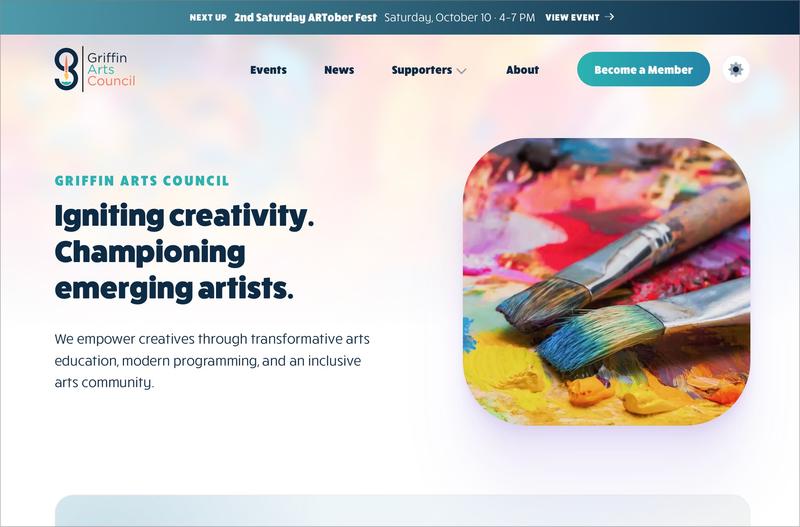
The result is two connected sites: griffinarts.org, the council's public website, and assets.griffinarts.org, a public library for approved brand files and guidance. Both use Jekyll and GitHub Pages. The choices keep the sites simple to operate while giving the organization useful ways to communicate from the beginning.
Start with the organization, not the software
A website can explain an organization, but it cannot create the legal and financial structure behind it. Alongside the web work, I filed the state paperwork to form the corporation, set up bank accounts, arranged payment processing, and configured the donation platform through Givebutter. I also submitted the IRS Form 1023-EZ application for federal tax-exempt status. As of this writing, the application is pending approval.
That status is important to communicate accurately. An application that has been submitted is not the same as an approval. The organization should update its public language when the IRS makes a decision, and donor-facing claims should match the organization's current status.
For a startup nonprofit, separating these tasks helps make the web project manageable. The site can provide a public explanation and direct people to the right next step, while banking, legal filings, and payment processing remain in the systems designed for those functions.
A public front door that works on phones
The main site gives Griffin Arts Council a place to describe its work, introduce its board, publish news, and share ways to participate. It is designed to adapt to phone screens as well as larger displays, because a visitor may be checking an event or donation link from a phone rather than sitting at a computer.


The goal is not to turn every visitor into a supporter. It is to make the next useful piece of information easy to find. The site gives people a central address they can share when someone asks what the council does, who is involved, or how to take part.
A startup website should answer the next question, not anticipate every future feature.
An events list answers a practical question
One of the most direct reasons to have a website is to tell people what is happening next. The events section gives each listing a title, date, time, location, and optional cost and ticket link. Event labels can identify formats such as workshops, art shows, or fundraisers. A short list of upcoming events can also appear on the home page.
This is a modest feature with a clear job: help a resident, artist, or partner check what is coming up without needing to find a social media post. It also gives the council a consistent place to point people when it announces an event elsewhere.
An event listing is useful when people can see when it happens, where to go, and what to do next.
Events are stored as individual content files rather than hand-built into the page layout. That keeps the event information and the design separate. A new listing can follow the same structure as earlier ones, and the site can sort and display listings without someone manually rearranging a page every time the calendar changes.
Give people clear ways to support the work
The site separates several ways to get involved. A business can learn about sponsorship. An individual can review membership options or find the patron directory. Community partners have a directory of their own. The donation page embeds a Givebutter giving form, while the membership page links to the council's membership campaign.
Using a dedicated fundraising service means the council does not have to build a payment system into its website. The site presents the choice and connects the visitor to the appropriate Givebutter form. Payment processing and campaign settings stay with that service rather than being custom code in the website.
Let a payment provider handle payments. Keep the website focused on information and clear next steps.
That choice also means the cost is not automatically zero. Givebutter's pricing describes optional donor tips and payment-processing fees, and the amount a nonprofit pays depends on its settings and whether donors cover fees. Check the current pricing and campaign settings before estimating the net amount a donation will provide [1].
The site also includes a contact form handled by Formspree and a Givebutter signup widget. Each outside service has its own account, limits, privacy terms, and possible costs. A small organization should list those services and review the terms before relying on them. Outsourcing a feature can reduce custom development, but it does not remove the need to understand who handles the data and what happens if a free tier changes.
A separate library for official brand files
The second site, assets.griffinarts.org, solves a different problem. Organizations often share logos by forwarding an old email or asking someone to find a file on a personal computer. A public asset library gives board members, designers, printers, partners, and volunteers one place to find approved files.
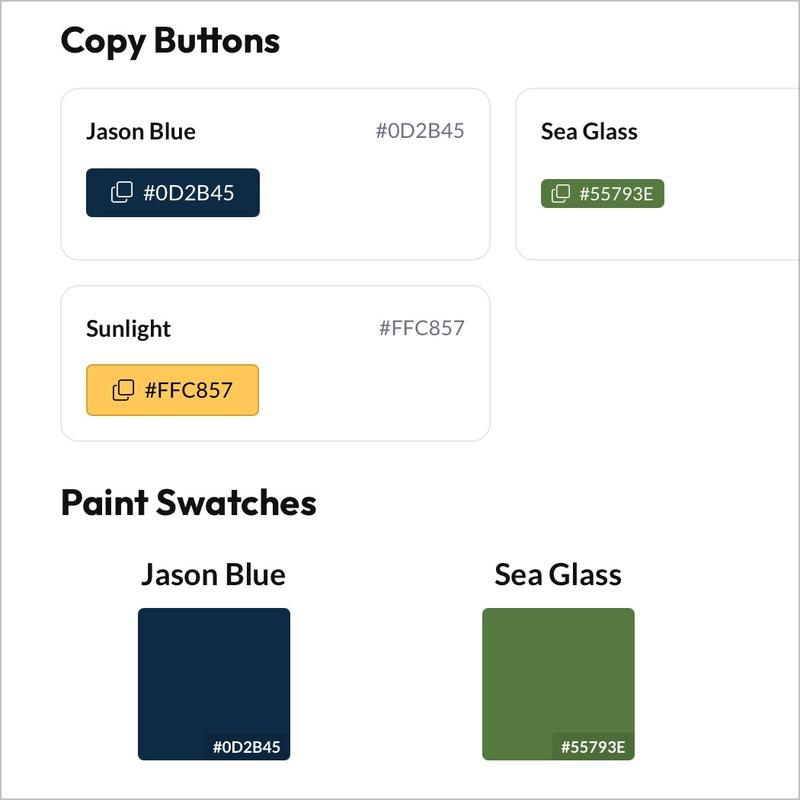
The library catalogs the council's horizontal, stacked, and G-logo configurations, including color and grayscale versions and formats for digital and print use. It also publishes logo guidance and a web color palette. The site uses the Just the Docs theme, which supplies navigation and search suited to a reference library.

The asset files are stored separately from the main website's content. This makes the library useful on its own and gives people a stable link to the right logo or guidance. New files need a matching catalog entry, so a file is not merely uploaded and left for visitors to discover by guessing its filename.
Why Jekyll and static pages fit this work
Both sites use Jekyll, a static site generator. In plain terms, Jekyll takes content, configuration, templates, and styles and creates ordinary HTML, CSS, and other files for a web server to deliver. The published pages do not need a running application server or a database for each visit [2] [3].
That tradeoff fits these sites. Their core jobs are publishing information, showing events and directories, and linking to outside services. Jekyll can render those pages from Markdown, HTML, and YAML source files. The council can add or change content without paying to develop a custom content-management application. The site also has documentation to help a future contributor preview the project and follow its publishing process.

A static site is not the right answer to every web problem. It does not provide a private member portal, a custom donation database, or server-side application logic by itself. If the council later needs those capabilities, it can use a service built for them or add a separate application. Keeping the public information site simple avoids building and maintaining features the organization does not yet need.
How the sites reach their custom domains
GitHub Actions builds the Jekyll source, then GitHub Pages publishes the generated files. GitHub supports custom Actions workflows for building a static site and deploying the resulting artifact [4]. The two repositories have separate jobs: the GAC site builds from its source repository, while the asset library deploys from its own repository.
The main GAC site uses a production branch and a required build check. Changes are proposed through a pull request, the check verifies that the production site can build, and the approved version is deployed to griffinarts.org. A staging workflow also exists, but staging publishing is paused at the time of writing. The asset library has a simpler workflow: a change to its main branch starts a build and deploys the reference site to assets.griffinarts.org.

GitHub Pages supports custom domains, but the domain registration and DNS still need to be managed. GitHub can provision HTTPS after a domain is configured correctly [5]. A domain name therefore remains a separate renewal cost even when the hosting platform has no additional charge.
What “low cost” means in practice
Jekyll itself is open-source software, and GitHub Pages can make the hosting bill very small for a public, content-focused site. The exact cost depends on the repository and account configuration, however. GitHub Free includes Pages for public repositories. The GAC source repository is private, so its hosting eligibility and any account-plan cost must be considered separately. Do not assume that a private source repository qualifies for the same no-cost arrangement as a public repository [6].
For another small nonprofit choosing this approach, a public source repository can keep the software and Pages hosting cost at zero under GitHub Free, if the organization is comfortable making the source public. That does not make every part of the project free. Budget for:
- domain registration and renewal;
- any GitHub plan or Actions usage beyond the included allowance;
- payment-processing fees or other fundraising-service costs;
- optional fees for contact forms, email, analytics, or other outside services; and
- the time someone needs to write, review, update, and maintain the content.
GitHub documents size, bandwidth, and other usage limits for Pages, and says the service is not intended as free hosting for an online business or a site primarily built to facilitate commercial transactions [7]. This GAC site is an informational nonprofit site, with donation handling provided by Givebutter rather than custom payment code. Each organization should review the current terms and limits against its own use.
The most honest budget claim is not “a nonprofit website costs nothing.” It is that a small organization can publish a useful informational site without buying a server or commissioning a custom application, if it keeps the feature set appropriate, checks repository eligibility, and accounts for domains and third-party services.
Check whether the site is doing its job
A new website does not need years of analytics to be useful. Early on, the practical test is whether it reliably helps someone complete a task: find the next event, understand how to participate, make a donation, or download the correct logo. Those are service checks, not claims that the site has changed attendance or created measurable community impact.
A small nonprofit can review a few simple signals every month or quarter:
- Event information: Check that upcoming listings show the right date, time, location, cost, and ticket link. Ask event partners whether they can quickly find the details they need to share.
- Ways to participate: Test the membership, donation, contact, and signup paths on a phone. Confirm that each button reaches the right form and that a visitor can tell what happens next.
- Fundraising handoff: Compare the donation and membership links on the site with the active Givebutter campaigns. Where campaign reporting allows, review completed transactions separately from page visits or button clicks.
- Brand materials: Ask a board member or partner to locate the right logo for a specific use. If they cannot tell which file to download, improve the catalog or the usage notes.
- Content maintenance: Review key pages for outdated dates, contact details, or descriptions. Note who owns each update so information does not depend on one person remembering every change.
These checks need no elaborate measurement system. A shared checklist, a short conversation with event organizers, and the reports already available from the donation platform may be enough to identify broken links or unclear instructions. If the organization uses web analytics, focus on a few questions that can guide a change, such as whether people reach the event page or click through to a campaign. Avoid collecting personal information that is not needed.
Keep activity and outcomes distinct. Page views and link clicks can show whether people used a path; they do not prove that a website caused someone to attend, donate, or take part. As programs develop, the council can compare site activity with event registrations, donations, or participant feedback, using clear date ranges and definitions. Until then, the useful result is a working, maintainable way to publish information and connect people to the next step.
Measure whether the path works before claiming it changed the outcome.
A practical starting point for another small nonprofit
If you are starting a similar organization on a restricted budget, begin with the information people need most: what the organization does, who is responsible for it, what is happening next, and how to participate or contribute. Choose a setup that matches those needs rather than paying to build a custom system before you know you need one.
Use static hosting for public information that changes at a manageable pace. Keep payments and other sensitive workflows with services designed to handle them. Store approved brand files somewhere people can find them. Document how updates work so the site does not depend on one developer forever. Check the actual costs, account requirements, service terms, and renewal dates before calling the plan free.
Griffin Arts Council now has a public home at griffinarts.org and a brand library at assets.griffinarts.org. They give a new organization a practical place to share information while it builds its programs, relationships, and operating capacity.
- Givebutter. (2026). Givebutter Pricing. Givebutter. https://givebutter.com/pricing
- GitHub. (2026). Setting Up a GitHub Pages Site with Jekyll. GitHub. https://docs.github.com/en/pages/setting-up-a-github-pages-site-with-jekyll
- GitHub. (2026). What Is GitHub Pages?. GitHub. https://docs.github.com/en/pages/getting-started-with-github-pages/what-is-github-pages
- GitHub. (2026). Using Custom Workflows with GitHub Pages. GitHub. https://docs.github.com/en/pages/getting-started-with-github-pages/using-custom-workflows-with-github-pages
- GitHub. (2026). Configuring a Custom Domain for Your GitHub Pages Site. GitHub. https://docs.github.com/en/pages/configuring-a-custom-domain-for-your-github-pages-site
- GitHub. (2026). GitHub’s Plans. GitHub. https://docs.github.com/en/get-started/learning-about-github/githubs-plans
- GitHub. (2026). GitHub Pages Limits. GitHub. https://docs.github.com/en/pages/getting-started-with-github-pages/github-pages-limits