jekyll-color-copy-tag
A Jekyll Liquid tag that renders clickable hex color buttons and swatches with copy-to-clipboard functionality.
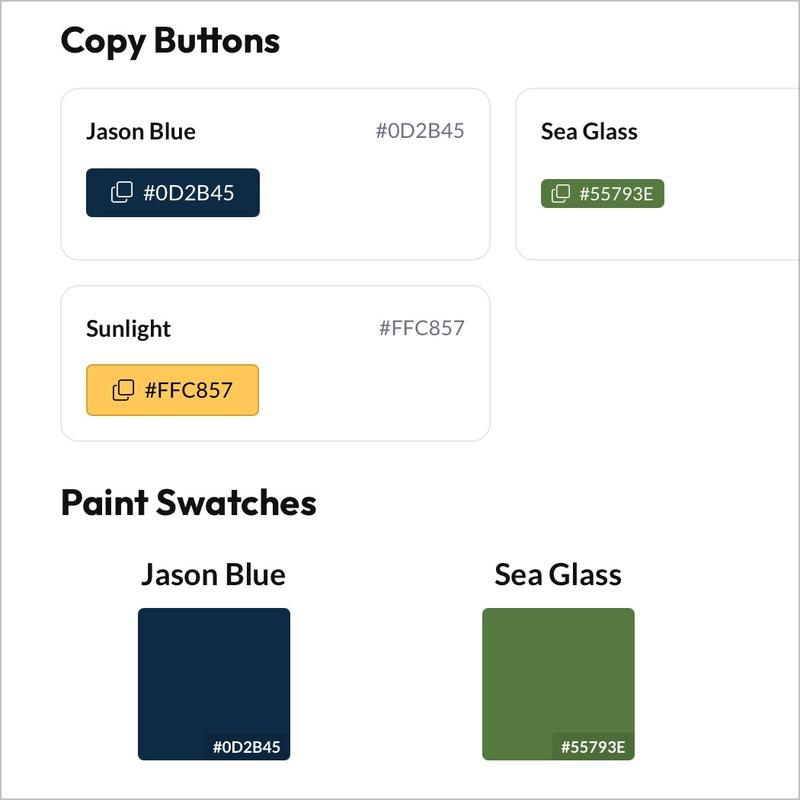
jekyll-color-copy-tag is a Jekyll plugin that renders clickable hex color copy buttons and paint swatches. It uses WCAG contrast ratio math to choose black or white text for optimal accessible contrast, and it ships with its own SVG icons and a small JavaScript helper. No FontAwesome or other icon libraries required.
Demo
Copy Buttons
Paint Swatches
Swatches also support custom dimensions:
Installation
Add the gem to your Gemfile:
gem "jekyll-color-copy-tag"
Enable it in _config.yml:
plugins:
  - jekyll-color-copy-tag
That’s it—the JavaScript is automatically injected into pages that use the tag.
Usage
Copy Buttons
Render clickable copy-to-clipboard buttons in three sizes:
{% color_copy '#2BB3B1' %}          {# medium (default) #}
{% color_copy '#2BB3B1', sm %}      {# small #}
{% color_copy '#2BB3B1', lg %}      {# large #}
Paint Swatches
Render clickable paint swatches with the hex value displayed in the corner:
{% color_copy '#2BB3B1', swatch %}                {# uses config dimensions #}
{% color_copy '#2BB3B1', swatch_150x150 %}      {# override to 150×150 #}
{% color_copy '#2BB3B1', swatch_200x100 %}      {# custom width×height #}
Configuration
Customize the copied-to-clipboard feedback color and swatch dimensions in _config.yml:
color_copy:
  copied_color: "#2BB3B1"
  swatch_width: 100
  swatch_height: 100
copied_color— The background color shown when the button/swatch is clicked (defaults to#2BB3B1)swatch_width— Paint swatch width in pixels (defaults to100px)swatch_height— Paint swatch height in pixels (defaults to100px)
Features
- WCAG Accessible — Automatically chooses black or white text based on WCAG contrast ratio math for optimal readability
- No Dependencies — Includes its own SVG icons; does not require FontAwesome or other icon libraries
- Copy-to-Clipboard — One-click hex value copy with visual confirmation
- Flexible Sizing — Small, medium, and large button variants; configurable paint swatch dimensions
- Standards Compliance — Renders with semantic HTML and follows accessibility best practices
Credits
Icons from Bootstrap Icons (MIT License)